Identify the device
Each enrolled computer uses a separate VPN identity.
A hosted workspace with private access for small and medium businesses. Bring your own business applications, choose Windows or Linux, and grow as your team needs.
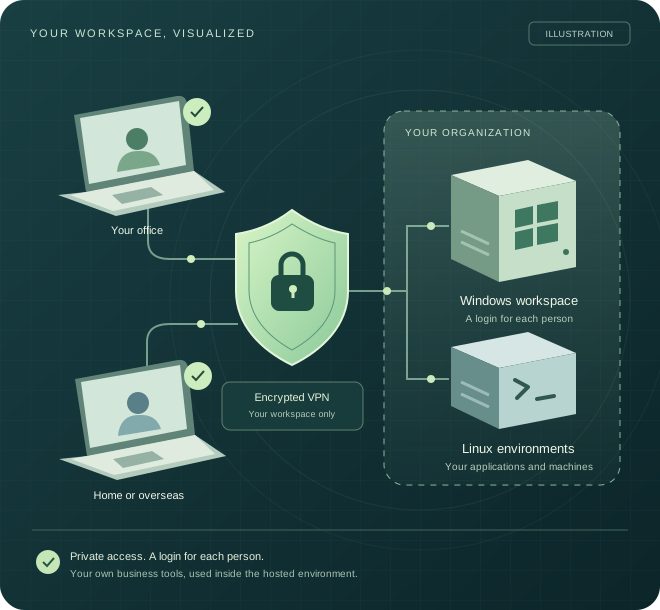
THE WHOLE SETUP, AT A GLANCE
From a team member's device to their business tools. Choose a Windows or Linux journey, then select any stage to see what it does.
A team member connects from an approved computer. Each enrolled device gets its own VPN identity, so a laptop and a desktop do not share the same connection key.
Illustrative architecture. Access, workloads and authentication are agreed for each customer.VPN access and user sign-in are separate controls.
Each enrolled computer uses a separate VPN identity.
The VPN carries access to assigned private resources.
Individual sign-in and permissions. MFA can be configured.
Authentication scope agreed at setupCustomer environments are separated, with permitted routes between assigned systems.
BUILT FOR SMALL AND MEDIUM BUSINESSES
For businesses that need managed workspaces for staff and assistants, without building their own hosting infrastructure or issuing a dedicated laptop for every suitable role.
A bookkeeping assistant signs in to their own Windows session and uses your approved accounting applications. Your team works in the same hosted environment, with individual permissions.
Use your own eligible software licences and agreed storage, such as your organization's OneDrive. Shared application use is checked during setup.
Give approved staff and legal assistants access to the firm's document, email and practice applications from one managed environment, wherever their agreed work location may be.
Separate logins and agreed file permissions let people reach the work they need. Your firm retains its business accounts and eligible application licences.
A remote employee, contractor or overseas assistant connects through private VPN access and works inside their assigned desktop. Keep business applications in a central environment as your team grows.
Tell us during planning. U.S. hosting and outbound IP availability must be confirmed for your setup, alongside approved access locations.
For practices exploring controlled access for administrative or billing teams, including organizations with HIPAA requirements.
HIPAA suitability, required safeguards and a Business Associate Agreement must be confirmed before handling electronic protected health information.
Read the healthcare requirementsReduce the need for dedicated company laptops. Each person still needs a compatible, secure computer and a reliable connection.
Keep your Microsoft 365 tenant and business accounts. We check application compatibility, hosting rights and shared-use eligibility.
Agree access, storage and recovery arrangements. A hosted desktop alone does not prevent local copying or eliminate data loss.
A good fit when you want a managed place for your team to work. Start with the people and applications you need; add users and environments as your business grows.
Tell us about your teamCHOOSE YOUR ENVIRONMENT
Start with the environment that fits your work. Capacity and applications are agreed before onboarding.
Several approved users can work in separate sessions within your organization's environment, subject to the agreed capacity and supported licensing.
Access your assigned Linux machines through the same private VPN approach. We agree the resources, access method and operational responsibilities around your workload.
Linux is scoped as an environment rather than using the Windows desktop seat tariff. Individual access accounts still apply where needed.
HOW PRIVATE ACCESS WORKS
The connection, the device and the person have separate roles. Access is restricted to the resources assigned to your organization.
Install the approved connection package. Each computer receives its own VPN identity.
Reach your assigned workspace through an encrypted tunnel, then sign in with your individual account and configured authentication.
Use your applications inside the hosted environment. Your normal local browsing stays on your own connection under the standard split-tunnel setup.
MFA can be included in the agreed setup. Windows Hello for Business options depend on compatible devices, identity configuration and the supported remote sign-in method.
MONITORED BEHIND THE SCENES
Our provider-side control centre brings together available VPN and Windows-host signals to help investigate access and performance problems.
Enrolled device identities, VPN observations and the private resources assigned to your organization.
Available host reachability and resource signals help identify problems in the hosted environment.
Available session and transport records help us investigate reported freezes, disconnects and reconnects.
Monitoring coverage and support response are agreed for your environment. Available signals support troubleshooting; they do not guarantee uninterrupted sessions.
BRING YOUR OWN BUSINESS TOOLS
Keep using your own Microsoft 365 tenant, accounts and data. We provide the hosted workspace and agreed access setup; you bring qualifying application subscriptions.
The workspace is provider-hosted. It is not automatically deployed inside your Azure tenant.
Use Outlook on the web, Word, Excel and other compatible web applications inside your Windows workspace, with your own account and subscription entitlements.
Browser inside the remote desktopUse supported Outlook, Word, Excel and other approved desktop applications inside Windows. Shared use requires eligible activation and hosting rights, which we check during onboarding.
Eligible licences requiredSTART SMALL. MAKE ROOM TO GROW.
Add Windows users as your team grows. Additional capacity and environments are scoped to your needs.
Billing interval, included resources, application licensing, taxes and any additional charges are confirmed in your quote. Larger teams may require extra capacity.
Plan a Windows workspaceTell us what you need to run. We'll scope the VMs, resources, access and support arrangements with you.
GROW YOUR ENVIRONMENT
Combine Windows workspaces and Linux VMs within your organization's private environment. Define which systems can communicate and which users can reach them. Extra VMs and capacity are quoted separately.
Permitted connections · Separate access rules
A FEW THINGS TO KNOW
The service uses private access, individual identities and scoped permissions. A VPN alone does not establish a complete Zero Trust architecture. Identity, device and access policies need to be designed and verified for the agreed environment.
We describe the controls included in your setup rather than promise blanket protection. Read NIST's explanation of Zero Trust ↗
You can use your own accounts and qualifying subscriptions. Browser applications depend on your plan's entitlements. Installed Office applications on a shared desktop need eligible shared computer activation and hosting rights; not every subscription qualifies.
We review these requirements before onboarding. Microsoft 365 subscriptions are separate unless your quote includes them. Microsoft's shared activation guidance ↗
Windows workspaces are scoped for separate simultaneous user sessions within the agreed resources and supported Windows/RDS licensing model. A user account, an enrolled device and a simultaneous session are different allowances. We confirm these for your team before service starts.
We assess the locations and devices your team needs. Connection quality depends on internet service, distance from the host and the applications in use. Windows onboarding has been deployed. Mac access is being piloted; ask us to confirm availability and supported versions for your Mac.
Applications running inside the hosted desktop use the hosted environment's internet connection. If you need a U.S. outbound IP, ask us to confirm the hosting region and network configuration before ordering. A dedicated or fixed IP is not included unless specifically agreed.
This does not change a user's physical location or automatically determine where every application stores its data. Under the standard split-tunnel setup, local browsing uses the device's own connection. Access must follow your organization's policies and the application's permitted locations.
Organizations with HIPAA obligations can discuss their requirements with us. HIPAA readiness for this service has not been established; do not use it for electronic protected health information until the service's suitability and responsibilities are confirmed.
A suitable arrangement requires an appropriate Business Associate Agreement, risk assessment and required safeguards covering access, operations and data handling. VPN access alone does not establish compliance. HHS guidance on cloud services and HIPAA ↗
MFA can be configured as part of the agreed access setup. Windows Hello for Business remote sign-in depends on the device, identity environment and supported authentication method. It is assessed during onboarding rather than offered as a universal switch.
Use the storage agreed for your organization, such as your own OneDrive or an assigned drive. Backup coverage, retention and recovery arrangements are confirmed in your service scope. Files on a remote desktop should not be assumed to be backed up automatically.
Central storage can reduce reliance on files kept only on an individual's laptop, but it does not eliminate data loss. Local copying controls and recovery arrangements must be explicitly configured and verified.
Provider-side operations use available VPN-device and Windows-host telemetry to help investigate access and performance problems. Desktop troubleshooting can also use available session and transport records alongside the time and symptoms you report.
The monitoring scope, record retention and support arrangements are agreed for your environment. A recent connection signal alone does not confirm that a desktop is responsive. The illustration above explains the approach; it is not a customer portal or a live service-status display.
We provide the agreed hosting, private access and platform operations. You manage your authorized people, business use and qualifying application subscriptions. Application setup, support hours, security controls and any Linux administration responsibilities are agreed in your quote.
User and device changes currently follow the agreed support process.
LET'S SHAPE YOUR WORKSPACE
Choose an environment, outline the work, and prepare a short requirements summary.
This planner prepares a summary in your browser. It does not send an enquiry or provision a workspace.